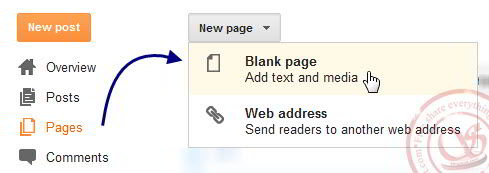
Đầu tiên để có một trang Sitemap, hãy tạo một trang trống: Dashboard > Pages > New page > Blank page và đặt tên theo ý bạn.
Sitemap hiển thị theo ngày đăng bài
Xem demo sitemap theo ngày đăng

1
2
3
| // Phiên bản tiếng Việt<script style="text/javascript" src="http://salipropham-blogspot-com.googlecode.com/files/sitemap1-vn-min.js"></script> <script src="http://DiaChiBlog/feeds/posts/default?max-results=900&alt=json-in-script&callback=loadtoc"></script> |
1
2
3
| // Phiên bản tiếng Anh<script style="text/javascript" src="http://salipropham-blogspot-com.googlecode.com/files/sitemap1-en-min.js"></script> <script src="http://DiaChiBlog/feeds/posts/default?max-results=900&alt=json-in-script&callback=loadtoc"></script> |
Sitemap hiển thị theo danh mục lable
Xem demo sitemap theo danh mục lable

1
2
| <script style="text/javascript" src="https://salipropham-blogspot-com.googlecode.com/files/sitemap2-lable-min.js"></script> <script src="http://DiaChiBlog/feeds/posts/default?max-results=900&alt=json-in-script&callback=loadtoc"></script> |
Sitemap hiển thị theo danh mục lable với jQuery
Click here: sitemap theo danh mục jQuery
Hãy thay DiaChiBlog bằng blog của bạn, thay đổi max-results để hiển thị số bài viết tối đa được liệt kê


0 nhận xét:
Đăng nhận xét